
Remote jobs make us comfortable and flexible, but they also entail new online threats. Hackers routinely attempt to steal data, break into accounts and breach home networks with little more than a kid hacking his parent’s WiFi network. That’s why Cybersecurity Tips for Remote Work is important to learn. Regardless of whether you are working for someone or doing things on a freelance basis or even owning your own company, keeping your personal and work data secure should be one of the main concerns.
In this article here’s what you’ll learn to stay safe secure more productive while working from home.
Use Strong and Unique Passwords
People still commonly use weak passwords such as “123456,” “password” or their own name. There had been very, simple passwords to crack. Make sure to always have strong and unique passwords for any account you use.
A strong password includes:
- Uppercase and lowercase letters
- Symbols
- Numbers
- At least 12–14 characters
Don’t use the same password everywhere. One account gets hacked and all your accounts are vulnerable. Rather use a password manager to keep your passwords secure. Strong password is one of the important Cybersecurity Tips for Remote Work and it acts as your first line of defense.
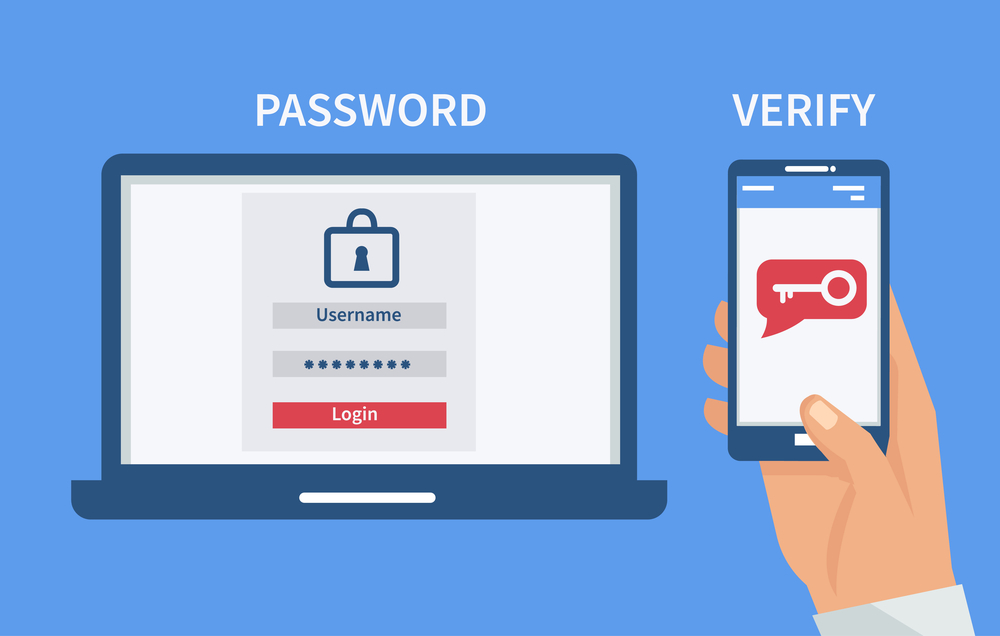
Turn On Two Factor Authentication (2FA)
A strong password can still be stolen. Two-Factor Authentication provides an added level of security. It just requires a second step like:
- A text code
- A fingerprint
- A code from an authenticator app
This can make it more difficult for hackers to get into your accounts. They can’t log in even if they know your password without that second verification. Rely on apps such as Google Authenticator for greater security.
Keep Your Devices Updated
Old, outdated software is a frequent target for cybercriminals. Updates mitigate security vulnerabilities to help keep users and their systems safe. Make sure you:
- Turn on automatic updates
- Update your operating system
- Update your browser and plugins
- Update antivirus software
Modern devices will block many attacks before they have a chance to damage your system. This is one of the most essential Cybersecurity Tips for Remote Work since old software is a common way in for the hackers.
Protect Your Wi Fi Network
Cybercriminals love your home Wi-Fi. If your Wi-Fi is unencrypted hidden behind a weak password or simply insecure, hackers may be able to intercept and steal any information you see on the internet. For an added measure of security, it is crucial to connect through secure Wi Fi for remote work Wi Fi connections when working remotely.
Make your network safe by:
- Changing the default router password
- Using WPA3 or WPA2 encryption
- Hiding your network name
- Updating your router firmware
- Work-avoiding use of public Wi-Fi
WiFi Sharing with Strangers Not being Douches With Your WiFi
Don’t use public Wi-Fi for work. If you do have to use it, always connect through a VPN.
Utilize a VPN obscuring your network traffic will add another layer of privacy and security when accessing Telegram.
With a VPN, your internet connection is encrypted and your IP address is obscured. That prevents hackers from easily seeing what you are doing online. When you access the company’s files or sensitive data, a VPN secures them.
If your company provides a VPN make sure to use it. If they don’t get a trusted paid VPN service. Free VPNs can put your data at risk. A VPN is an important part of Cybersecurity Tips for Remote Work because it keeps your online activities safe and private.
Avoid Phishing Emails
Among the tricks hackers deploy, phishing emails are one of the most common. These emails appear authentic to try and make you click a link or download something bad. To avoid phishing:
- Check the sender’s email address
- Avoid visiting suspicious links
- Be careful with attachments
- Avoid sharing passwords over email
- Report any suspicious message
- If an email seems urgent or odd, confirm it before replying. Always stay alert.
Install Antivirus and Firewall Protection
Anti-virus software keeps your device safe from malware, spyware and viruses. Firewalls stare down your network traffic and thwart bad connections. Both tools are good to use when you want to keep your work files or personal information safe.
- Make sure your antivirus:
- Updates regularly
- Runs automatically
- Scans your device often
- These capabilities will add powerful defense against threats on the internet.
Backup Your Data Regularly
No one is immune to losing data It can occur as a result of hacking, device malfunctions or just plain old human error. With frequent backups you can recover your files and data at any time. Use the 3-2-1 rule:
- Keep 3 copies of your data
- Save them in 2 ways
- Save 1 off site or to the cloud
Cloud services such as Google Drive, OneDrive or Dropbox are useful for secure backups. It’ always a good idea to encrypt your backup files for added security.
Secure Your Work Devices
Your work devices contain valuable and sensitive information. Keep them safe by:
- Locking your screen while not using it
- Turning on device encryption
- Preventing others from sharing your device
- Applying remote-wipe utilities if you lose your machine
- This will help to keep your data safe even if your device is stolen.
Keep Work and Personal Use Separate
Lots feed personal and work tasks through the same device. This leaves them more susceptible to data breaches. If you can, separate the devices you use for work from those meant for personal use.
If you’re not able to separate the two types of devices, then make multiple user accounts on one device like one for work and another for personal use. That makes it less likely for your work files to fall prey to web based threats.
Use Cloud Services Safely
Cloud tools are useful but they still need to be secure. To stay safe:
- Log Off When finished with cloud services
- Limit access to important folders
- Use strong passwords
- Turn on two-factor authentication
These measures help further keep your files safe even if someone gets hold of your cloud account.
Keep Learning About Cybersecurity
Cyber threats change every day. To keep safe, you have to keep learning and updating your skills. You can:
- Take online cybersecurity courses
- Read trusted tech blogs
- Follow company security rules
- Discover Cybersecurity Tips for Working Remotely
- Practice safe online habits daily
The more knowledge you have, the more able you are to protect yourself from online threats.
Conclusion
Remote work is great, but there are some new online threats that people need to be mindful of You needn’t jump through many hoops to secure your data. just use strong passwords, turn on two factor authentication, keep your devices up to date and remain vigilant. The focus keyphrase Cybersecurity Tips for Remote Work keeps the things simple and tells you that little things can matter a lot.
With cyberattacks on the rise it’s more important than ever to stay safe. These easy and effective solutions can help you create a secure work environment from any location. Your data is precious keep it safe with proper habits and tools.
